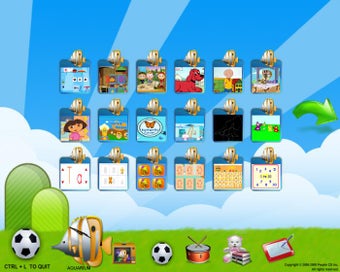
ZAC Browser keeps browsing inside safe lines
ZAC Browser, created by People CD Inc., is a legacy browser designed for children on the autism spectrum who need a simplified, safer browsing space. It limits access to a curated library of games, videos, music, stories, and educational material instead of opening the full web. Its large icons and low-distraction layout suit parents, teachers, and therapists who need an easier digital environment for supervised use.
Top Recommended Alternative

A browser built for narrow, calmer exploration
ZAC Browser creates a controlled learning and play environment by keeping children inside pre-selected content. Its curated library reduces exposure to the open web, while the visual-heavy interface makes navigation easier for users who benefit from clear, predictable choices. Because it was built specifically for children with autism, its narrow scope is intentional rather than a missing feature.
Safety comes from the walls around it
The browser supports a locked-down experience that keeps children inside the program and away from the desktop during use. This walled-garden approach helps prevent accidental access to unrelated apps, system areas, or unsuitable websites. However, claims around advanced monitoring or deep customization are limited, so caregivers still need to supervise sessions and understand how to exit the browser properly.
Useful for care settings, limited for everything else
Families, classroom staff, and therapists benefit from the large visual controls and sensory-friendly design, which reduce clutter and make browsing less overwhelming. The trade-off is clear: ZAC Browser is not a full web browser for research, extensions, or general browsing. Its legacy status also means support and compatibility can be a concern on newer setups.
Best when safety matters more than flexibility
ZAC Browser suits caregivers and educators who need a predictable, low-distraction internet space for neurodivergent children. It works best as a supervised, purpose-built tool rather than a regular browser replacement. Its strengths are safety and simplicity, while its limits come from the same controlled design and older software status.